A Modern, Updated SnapRAID Maintenance Script
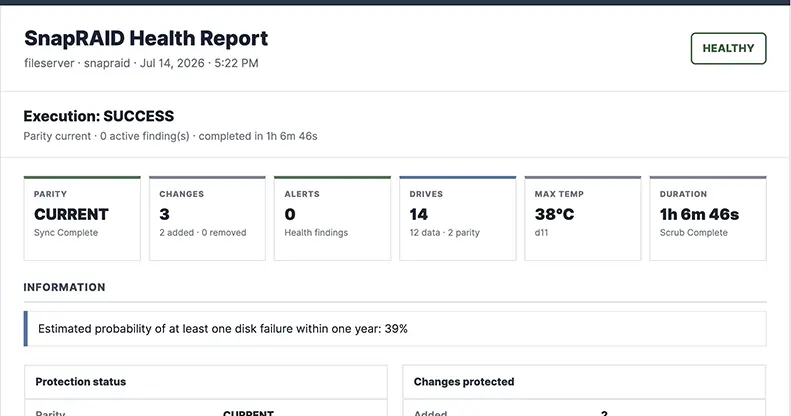
For the last several years, I have used a Bash script to automate routine maintenance on my SnapRAID array.
The original script worked well, but it grew organically. New checks were added as I encountered edge cases, reporting became more complicated, and assumptions that were reasonable for one array became brittle when multiple SnapRAID configurations or shared Docker services were involved.
I previously released an updated script in this post. Like anything in a homeleb, I’ve continued to tinker with and extend the capabilities of the script. This post covers the current version of the script: SnapRAID Helper 2.2.0.
The goal is not to hide SnapRAID behind a complicated management layer. The goal is to make scheduled maintenance:
- Safer
- Easier to monitor
- Easier to troubleshoot
- Explicit about what happened
- Practical for one or multiple SnapRAID configurations
- Aware of Docker applications that may change files
- Better at distinguishing a successful script run from a healthy array
The script still uses normal SnapRAID commands. It simply adds orchestration, validation, locking, reporting, and defensive decision-making around them.
If you’re already using my older Split Parity script, this can bea drop-in conceptual replacement if you modify the original script (I’d really suggest you use the config file though).
NOTE: Andrea, the author of SnapRAID, recently released version 14.0 along with the snapraid-daemon. It is a simple solution for uses with only one SnapRAID array. I’ve written a post about it, if you’d like to read more. You can view it here.
Download
Disclaimer: This script is provided as-is, without warranty or guarantee of any kind. It performs automated maintenance operations that can modify file timestamps, update SnapRAID parity, pause Docker containers, and act on information parsed from your system. Review the script and configuration carefully, test it manually, maintain independent backups, and confirm that all data, parity, and mergerfs mountpoints are correct before scheduling it. You assume all risk associated with its use. I am not responsible for data loss, service interruption, hardware damage, configuration errors, or other damages resulting from use or misuse of this script.
Download the current script and example profile:
The version covered by this tutorial should report:
1
snapraid-helper.sh 2.2.0
What the Script Does
First, let me start by saying this is going to be a very long post. This script can do a lot more than the previous version and builds in a bunch of extra reliability checks and features.
A normal run can perform the following workflow:
- Acquire a global maintenance lock.
- Pause configured Docker containers.
- Validate required mountpoints and optional source devices.
- Ask SnapRAID to parse and validate its own configuration.
- Detect zero sub-second timestamps.
- Run
snapraid touchautomatically when those timestamps are found. - Run
snapraid diff. - Parse the number of added, removed, updated, moved, copied, and restored files.
- Decide whether synchronization is safe based on configured thresholds.
- Run
snapraid syncwhen authorized. - Run a partial or full scrub when parity is in a safe state.
- Capture a final SnapRAID status snapshot.
- Run
snapraid smart. - Optionally spin down the array.
- Restore only the Docker containers paused by this invocation.
- Save a complete diagnostic log.
- Send a health-aware HTML email.
- Notify Healthchecks or a compatible endpoint.
- Notify via Ntfy for one or multiple configs.
Major Features
Multiple SnapRAID Configurations
The script can run one configuration:
1
snapraid-helper.sh --config /etc/snapraid.conf
several configurations:
1
2
3
snapraid-helper.sh \
  --config /etc/snapraid-media.conf \
  --config /etc/snapraid-archive.conf
all .conf files in a directory:
1
2
3
snapraid-helper.sh \
  --all \
  --config-dir /etc/snapraid-helper.d
or one or more profile files:
1
2
snapraid-helper.sh \
  --profile /etc/snapraid-helper.d/fileserver.env
1
2
3
snapraid-helper.sh \
  --profile /etc/snapraid-helper.d/media.env \
  --profile /etc/snapraid-helper.d/archive.env
Each selected array runs in a fresh worker process. This prevents variables, warning counters, job results, and report state from leaking from one array into the next.
Shared Docker Service Coordination
When several profiles are run together, the parent process collects the union of their configured Docker services. It pauses those services once before any array begins and restores them only after every array finishes. This avoids the situation where one running array might restore services causing writes to the other array that is still syncing.
Global and Per-Array Locks
The script uses two levels of flock protection:
- A global lock around the complete orchestration run
- A separate lock for each SnapRAID configuration
The default lock directory is:
1
/run/lock/snapraid-helper
This prevents overlapping cron jobs, accidental duplicate launches, and concurrent workers operating on the same configuration.
Mount Validation
A file existing below /mnt/parity does not prove that the parity disk is mounted.
The script can require that each data and parity filesystem is mounted before SnapRAID is allowed to run:
1
2
3
4
5
6
REQUIRED_MOUNTS=(
  /mnt/disk1
  /mnt/disk2
  /mnt/parity1
  /mnt/parity2
)
It can also verify the device backing a mountpoint:
1
2
3
4
declare -A EXPECTED_MOUNT_SOURCES=(
  ["/mnt/parity1"]="/dev/disk/by-uuid/AAAA-BBBB"
  ["/mnt/parity2"]="/dev/disk/by-uuid/CCCC-DDDD"
)
Neither of these options are required, but I would consider at least using the REQUIRED_MOUNTS option This provides much stronger protection against running after a failed or incorrect mount.
Safety Thresholds
The script can block synchronization when an unexpected number of files were removed or updated:
1
2
DEL_THRESHOLD=100
UP_THRESHOLD=500
The threshold is inclusive:
1
2
99 removals   allowed
100 removals  blocked
A blocked sync returns exit code 2, which is different from an operational failure.
Persistent Warning Counters
When automatic forced sync is enabled, consecutive threshold warnings are stored below:
1
/var/lib/snapraid-helper/<config-id>/
The counter survives a reboot and is isolated for each SnapRAID config file to make it easier to diagnose an issue.
Health-Aware Reports
The script tracks two separate ideas:
- Execution state: Did the automation work?
- Array health: Did the output reveal anything that needs attention?
A run can finish successfully while still generating an orange report because a SMART error was reported, scrub coverage is old, or a configured capacity threshold was crossed.
This version has a pool capacity option because many users of this script also have mergerfs pools, I wanted people to be able to report the overall pool capacity versus throwing a warning every time because one of your data disks are full.
The report evaluates:
- Parity state
- Sync and scrub completion
- Data errors
- Configured disk or pool capacity health
- New SMART error-count increases
- Failed-disk conditions and individual failure probability according to the selected policy
- Disk temperature
- Oldest scrub age
- Percentage of the array that has not been scrubbed
- Zero timestamp detection and correction
Mergerfs-Aware Capacity Health
Individual SnapRAID data disks do not always tell the whole capacity story.
With mergerfs, a branch may be 95% or even 100% full while the combined pool still has plenty of usable space. Treating every full branch as an unhealthy array creates noisy reports and hides the findings that actually matter.
So, I made the source of capacity health configurable:
1
2
CAPACITY_HEALTH_SOURCE="pool"
MERGERFS_POOL_PATH="/storage"
Supported policies are:
| Value | Health behavior |
|---|---|
disk | Individual SnapRAID data-disk utilization affects overall health |
pool | The configured mergerfs pool controls capacity health |
both | Either individual disks or the pool can affect health |
off | Capacity remains visible but never changes overall health |
Individual disk-capacity rows can also be shown or hidden independently:
1
REPORT_DISK_CAPACITY_WARNINGS=0
For most mergerfs installations, I recommend using the pool as the authoritative capacity check and hiding individual branch-capacity alerts.
SMART Baselines and Change Detection
Many SMART error counters are cumulative. Once a disk reports a value of 1, that value may remain at 1 indefinitely even when no new problem occurs.
The script can track the counter for each disk over time:
1
2
SMART_ERROR_HEALTH_MODE="delta"
SMART_ERROR_DELTA_WARN_COUNT=1
In delta mode, an unchanged count is historical information only:
1
2
3
Previous count: 1
Current count:  1
Result:          no active health warning
An increase becomes an active finding:
1
2
3
Previous count: 1
Current count:  2
Result:          attention required
The baseline is keyed by the disk’s actual serial number and stored below the per-array state directory:
1
/var/lib/snapraid-helper/<config-id>/smart-error-baseline.tsv
An unchanged historical count does not change the subject, overall health, active-alert count, or Items Requiring Attention. It can optionally appear once in the Drive Overview section of the report.
Responsive HTML Email
This script also can send a responsive HTML dashboard using email-safe tables.
The design is light-first and uses borders and accents rather than large tinted backgrounds. This helps it survive the forced dark-mode transformations used by Gmail and some mobile email clients.
And, a plain-text fallback is also available 🤓
Requirements
The script expects a modern Bash environment and common Linux utilities.
Core requirements include:
1
2
3
4
5
6
7
8
9
10
11
12
13
14
15
16
17
bash
awk
sed
grep
hostname
date
tee
mkdir
mktemp
basename
cp
mv
rm
flock
find
sort
stat
Depending on the features you enable, you may also need:
1
2
3
4
5
6
7
8
snapraid
docker
mutt
msmtp or another mail transport
curl or wget
findmnt
realpath or readlink
sha256sum or shasum
On Debian or Ubuntu, many of the supporting tools can be installed with:
1
2
3
4
5
6
7
8
9
10
11
12
sudo apt update
sudo apt install \
  bash \
  coreutils \
  findutils \
  gawk \
  grep \
  sed \
  util-linux \
  mutt \
  msmtp \
  curl
Install Docker and SnapRAID using the method appropriate for your server.
The script defaults to these executable locations:
1
2
3
SNAPRAID_BIN="/usr/local/bin/snapraid"
MAIL_BIN="/usr/bin/mutt"
DOCKER_BIN="/usr/bin/docker"
Use command -v to confirm the paths on your system:
1
2
3
command -v snapraid
command -v mutt
command -v docker
Override the paths in the profile when necessary.
Install the Script
Copy the downloaded script into /usr/local/sbin:
1
2
sudo cp snapraid-helper-v2.1.6.sh \
  /usr/local/sbin/snapraid-helper.sh
Set appropriate ownership and permissions:
1
2
sudo chown root:root /usr/local/sbin/snapraid-helper.sh
sudo chmod 750 /usr/local/sbin/snapraid-helper.sh
Verify the installed version:
1
/usr/local/sbin/snapraid-helper.sh --version
Expected output:
1
snapraid-helper.sh 2.1.6
Create the Supporting Directories
Create the profile, log, state, and lock directories:
1
2
3
4
5
sudo mkdir -p \
  /etc/snapraid-helper.d \
  /var/log/snapraid-helper \
  /var/lib/snapraid-helper \
  /run/lock/snapraid-helper
The script can create its own runtime directories if you forget.
Create a Profile
The profile is a trusted Bash file containing the settings for one array.
For a server using:
1
/etc/snapraid.conf
create:
1
/etc/snapraid-helper.d/fileserver.env
Start with the following example:
1
2
3
4
5
6
7
8
9
10
11
12
13
14
15
16
17
18
19
20
21
22
23
24
25
26
27
28
29
30
31
32
33
34
35
36
37
38
39
40
41
42
43
44
45
46
47
48
49
50
51
52
53
54
55
56
57
58
59
60
61
62
63
64
65
66
67
68
69
70
71
72
73
74
75
76
77
78
79
80
81
82
83
84
85
86
87
88
89
90
91
92
93
94
95
96
97
98
99
100
101
102
103
104
105
106
107
108
109
110
111
112
113
114
115
116
117
118
119
120
121
122
123
124
125
126
127
128
129
130
131
132
133
134
135
136
137
138
139
140
141
142
143
144
145
146
147
148
149
150
151
152
153
154
155
156
157
158
159
160
161
162
163
164
165
166
# /etc/snapraid-helper.d/media.env
#
# Trusted Bash profile for one SnapRAID array.
# Recommended ownership and permissions:
#   sudo chown root:root /etc/snapraid-helper.d/media.env
#   sudo chmod 600 /etc/snapraid-helper.d/media.env

SNAPRAID_CONF="/etc/snapraid-media.conf"

# Override these only when binaries are installed elsewhere.
SNAPRAID_BIN="/usr/local/bin/snapraid"
MAIL_BIN="/usr/bin/mutt"
DOCKER_BIN="/usr/bin/docker"

EMAIL_ADDRESS="yourusername@gmail.com"
EMAIL_SUBJECT_PREFIX="Media SnapRAID"

DEL_THRESHOLD=100
UP_THRESHOLD=500

# -1 = never force; 0 = force immediately; N = force on Nth breached run.
SYNC_WARN_THRESHOLD=-1

SCRUB_PERCENT=3
SCRUB_AGE=10
SMART_LOG=1
SPINDOWN_DISKS=0

MANAGE_SERVICES=1
REQUIRE_ALL_SERVICES_PAUSED=1
SERVICES=(sabnzbd sonarr radarr lidarr)

FAIL_FAST=1
SUMMARIZE_DIFF_EMAIL=1
DIFF_LIST_HEAD=20
DIFF_LIST_TAIL=20

LOG_DIR="/var/log/snapraid-helper"
STATE_DIR="/var/lib/snapraid-helper"
LOCK_DIR="/run/lock/snapraid-helper"
LOG_RETENTION_DAYS=90

HEALTHCHECKS_ALERTS=1
HEALTHCHECKS_URL="https://healthchecks.example.com/ping/"
HEALTHCHECKS_ID="replace-with-a-unique-id-for-this-array"
HC_TIMEOUT_SECS=10
HC_RETRIES=3

# Optional native ntfy notifications for this array/profile.
# Publish to either ntfy.sh or a self-hosted ntfy server.
NTFY_ALERTS=0
NTFY_URL="https://ntfy.example.com"
NTFY_TOPIC="snapraid-media"

# Authentication: prefer a token. Leave all fields empty for a public topic.
NTFY_TOKEN=""
NTFY_USERNAME=""
NTFY_PASSWORD=""

# all      = send healthy and problem results
# problems = attention, sync-blocked, critical, and failed results
# failures = sync-blocked, critical, and failed results only
# off      = disable delivery even if NTFY_ALERTS=1
NTFY_NOTIFY_LEVEL="problems"
NTFY_TIMEOUT_SECS=10
NTFY_RETRIES=3
NTFY_CLICK_URL=""
NTFY_MARKDOWN=1

# Optional final summary from the parent after all selected configs/profiles.
# These are host-level settings. During a multi-profile run, the first profile
# supplies the summary settings. Use a shared topic for the combined result.
NTFY_SUMMARY_ALERTS=0
NTFY_SUMMARY_URL="https://ntfy.example.com"
NTFY_SUMMARY_TOPIC="snapraid-summary"
NTFY_SUMMARY_TOKEN=""
NTFY_SUMMARY_USERNAME=""
NTFY_SUMMARY_PASSWORD=""
NTFY_SUMMARY_NOTIFY_LEVEL="all"
NTFY_SUMMARY_TIMEOUT_SECS=10
NTFY_SUMMARY_RETRIES=3
NTFY_SUMMARY_CLICK_URL=""

# Strongly recommended: identify every filesystem that must be mounted before
# SnapRAID is allowed to operate.
REQUIRED_MOUNTS=(
  /mnt/disk1
  /mnt/disk2
  /mnt/parity
)

# Optional stronger validation: verify which source device backs a mountpoint.
declare -A EXPECTED_MOUNT_SOURCES=(
  ["/mnt/parity"]="/dev/disk/by-uuid/REPLACE-ME"
  ["/mnt/disk1"]="/dev/disk/by-uuid/REPLACE-ME"
  ["/mnt/disk2"]="/dev/disk/by-uuid/REPLACE-ME"
)

# Email report detail:
#   summary    = dashboard only
#   changes    = dashboard plus changed paths
#   diagnostic = dashboard plus changed paths and a diagnostic excerpt
#   full       = dashboard plus the complete raw log
EMAIL_DETAIL_LEVEL="summary"
EMAIL_DETAIL_ON_WARNING="changes"
EMAIL_DETAIL_ON_FAILURE="diagnostic"

# HTML is recommended because email clients use proportional fonts for plain text.
# Use "text" only when the receiving mail client cannot display HTML.
EMAIL_FORMAT="html"
# v2.2.0 uses an inversion-safe light palette plus explicit dark-mode CSS.
# No additional theme setting is required.

# Capacity health policy. This affects report severity only; it does not
# authorize or block synchronization.
#
#   disk = individual SnapRAID disks affect overall health
#   pool = only the mergerfs/pool path affects overall health
#   both = both individual disks and the pool affect health
#   off  = capacity is displayed but does not affect health
#
# Recommended for mergerfs users:
CAPACITY_HEALTH_SOURCE="pool"
MERGERFS_POOL_PATH="/storage"
POOL_USAGE_WARN_PERCENT=85
POOL_USAGE_CRITICAL_PERCENT=95

# Individual branch utilization can still be displayed without turning the
# report orange when CAPACITY_HEALTH_SOURCE is pool or off.
DISK_USAGE_WARN_PERCENT=85
DISK_USAGE_CRITICAL_PERCENT=95
REPORT_DISK_CAPACITY_WARNINGS=1

DISK_TEMP_WARN_C=40
DISK_TEMP_CRITICAL_C=50
SCRUB_AGE_WARN_DAYS=30
SCRUB_AGE_CRITICAL_DAYS=60
UNSCRUBBED_WARN_PERCENT=50
UNSCRUBBED_CRITICAL_PERCENT=80
# SMART error counters are usually cumulative. "delta" records a baseline and
# only changes overall health when a count increases on a later run.
# Options: delta | threshold | off
SMART_ERROR_HEALTH_MODE="delta"
SMART_ERROR_WARN_COUNT=1
SMART_ERROR_DELTA_WARN_COUNT=1

# Show unchanged cumulative counts once in the Drive Overview. They do not
# affect health or the email subject in delta mode.
REPORT_HISTORICAL_SMART_ERRORS=1

# Individual failure-probability behavior:
#   failure-only = critical only at SMART_FAILED_FP_PERCENT (recommended)
#   warning      = attention at SMART_FP_WARN_PERCENT
#   off          = display only
SMART_FP_HEALTH_MODE="failure-only"
SMART_FP_WARN_PERCENT=10
SMART_FAILED_FP_PERCENT=100

# Aggregate failure probability increases naturally with the number of disks.
# Leave informational unless you explicitly want it treated as a warning.
AGGREGATE_FP_IS_WARNING=0

# Send a warning result to Healthchecks for health findings while retaining a
# successful process exit code when the automation itself completed normally.
HEALTH_WARNINGS_FAIL_HEALTHCHECK=1
Adjust the mountpoints, services, email address, disk mount options, and thresholds to match your server.
Secure the Profile
Profiles are sourced as Bash. A malicious command inside a profile would run with the same privileges as the maintenance script.
Make the profile root-owned and readable only by root:
1
2
3
4
5
sudo chown root:root \
  /etc/snapraid-helper.d/fileserver.env

sudo chmod 600 \
  /etc/snapraid-helper.d/fileserver.env
When the helper runs as root, it rejects a profile that:
- Is not owned by root
- Is writable by the group
- Is writable by other users
Find Stable Disk Identifiers
For EXPECTED_MOUNT_SOURCES, use stable /dev/disk/by-* paths rather than /dev/sdX names.
List UUID links:
1
ls -l /dev/disk/by-uuid/
Test each path carefully before enabling source verification. An incorrect expected source intentionally stops the maintenance run.
Configure Capacity Health for mergerfs
If your SnapRAID data disks are combined through mergerfs, configure the pool as the authoritative capacity source.
For a pool mounted at /storage:
1
2
3
4
5
6
7
CAPACITY_HEALTH_SOURCE="pool"
MERGERFS_POOL_PATH="/storage"

POOL_USAGE_WARN_PERCENT=85
POOL_USAGE_CRITICAL_PERCENT=95

REPORT_DISK_CAPACITY_WARNINGS=0
With this configuration:
- A branch disk can reach 100% without changing overall health.
- The email remains green when the combined pool is below its warning threshold.
- The report becomes attention-level when
/storagereaches 85%. - The report becomes critical when
/storagereaches 95%. - SMART, temperature, scrub, mount, parity, and execution findings still affect health normally.
Configure Email
The script uses mutt to send the generated report. mutt still needs a working local mail transport. A lightweight option is msmtp. The exact mail setup depends on the provider, but the path should ultimately work with a simple test such as:
1
2
printf 'SnapRAID mail test\n' |
  mutt -s 'SnapRAID test' -- yourname@example.com
The script supports two email formats:
1
EMAIL_FORMAT="html"
Recommended. Sends the responsive health dashboard.
1
EMAIL_FORMAT="text"
Uses a plain-text fallback for minimal mail clients.
Configure SMART Baselines
For most systems, use:
1
2
3
4
5
6
SMART_ERROR_HEALTH_MODE="delta"
SMART_ERROR_DELTA_WARN_COUNT=1
REPORT_HISTORICAL_SMART_ERRORS=1

SMART_FP_HEALTH_MODE="failure-only"
SMART_FAILED_FP_PERCENT=100
On the first run, the script records each disk’s current count as its serial-number-based baseline. A disk already showing one historical error will not automatically make the report yellow. A future increase from 1 to 2 will.
The baseline is stored at:
1
/var/lib/snapraid-helper/<config-id>/smart-error-baseline.tsv
To intentionally reset all baselines:
1
find /var/lib/snapraid-helper -name smart-error-baseline.tsv -delete
The next run establishes a fresh baseline. Do not reset it routinely, because that discards the history needed to identify increases.
Configure Healthchecks
Healthchecks integration is optional.
Enable it with:
1
2
3
HEALTHCHECKS_ALERTS=1
HEALTHCHECKS_URL="https://healthchecks.example.com/ping/"
HEALTHCHECKS_ID="your-unique-check-id"
Each array should use a unique check ID.
The script sends:
/startwhen the worker begins- A normal ping after a healthy successful run
/<exitcode>after a failure or safety block
When this is enabled:
1
HEALTH_WARNINGS_FAIL_HEALTHCHECK=1
an array-health warning also sends a non-success Healthchecks result, even though the script itself retains exit code 0 when the automation completed normally.
This distinction is intentional:
1
2
Script execution succeeded
Array health needs attention
NTFY: Per-array ntfy notifications
I’ve added ntfy alerts in this 2.2.0 version. Each worker can publish its own result after health evaluation is complete. This works with:
1
--profile fileserver.env
multiple profiles:
1
--profile media.env --profile archive.env
and --all.
Each notification includes:
- Execution result
- Health result
- Parity status
- Added, removed, and updated counts
- Run duration
- Primary health finding or note
- Full server-side log path
Optional orchestration summary
The parent process can send one final combined message after all selected arrays finish:
1
2
3
4
3 arrays: 2 healthy · 0 notice · 1 attention · 0 blocked · 0 critical · 0 failed
- media: HEALTHY — No active findings
- archive: ATTENTION — SMART error count increased on d04
- backup: HEALTHY — No active findings
Per-array profile configuration
Add this to /etc/snapraid-helper.d/fileserver.env:
1
2
3
4
5
6
7
8
9
10
11
12
13
14
15
16
17
18
19
20
21
22
23
24
25
26
27
28
29
30
# Enable native ntfy notifications for this array.
NTFY_ALERTS=1

# ntfy server base URL, without the topic.
NTFY_URL="https://ntfy.yourdomain.com"

# Topic for this array.
NTFY_TOPIC="snapraid-fileserver"

# Use a bearer token for protected topics.
NTFY_TOKEN=""

# Alternatively, use username/password authentication.
NTFY_USERNAME=""
NTFY_PASSWORD=""

# all      = every result, including healthy
# problems = attention, blocked, critical, and failed
# failures = blocked, critical, and failed only
# off      = disable delivery
NTFY_NOTIFY_LEVEL="problems"

NTFY_TIMEOUT_SECS=10
NTFY_RETRIES=3

# Optional URL opened when the notification is tapped.
NTFY_CLICK_URL=""

# Allow ntfy to interpret the message as Markdown.
NTFY_MARKDOWN=1
For a public topic on ntfy.sh, this could be as simple as:
1
2
3
4
NTFY_ALERTS=1
NTFY_URL="https://ntfy.sh"
NTFY_TOPIC="your-private-hard-to-guess-topic"
NTFY_NOTIFY_LEVEL="problems"
Authentication
Bearer token:
1
2
3
NTFY_TOKEN="tk_your_token_here"
NTFY_USERNAME=""
NTFY_PASSWORD=""
Basic authentication:
1
2
3
NTFY_TOKEN=""
NTFY_USERNAME="zack"
NTFY_PASSWORD="your-password"
Note: The token takes precedence when both are configured.
Notification levels
Notify for every run
1
NTFY_NOTIFY_LEVEL="all"
Sends healthy, notice, attention, blocked, critical, and failed results.
Notify only when something needs attention
1
NTFY_NOTIFY_LEVEL="problems"
Sends:
- Attention
- Sync blocked
- Critical
- Failed
This is what I’d use by default.
Notify only for serious results
1
NTFY_NOTIFY_LEVEL="failures"
Sends:
- Sync blocked
- Critical
- Failed
Disable without removing settings
1
NTFY_NOTIFY_LEVEL="off"
Combined multi-array summary
Add these settings to the first profile passed on the command line:
1
2
3
4
5
6
7
8
9
10
11
12
13
14
NTFY_SUMMARY_ALERTS=1

NTFY_SUMMARY_URL="https://ntfy.yourdomain.com"
NTFY_SUMMARY_TOPIC="snapraid-summary"

NTFY_SUMMARY_TOKEN=""
NTFY_SUMMARY_USERNAME=""
NTFY_SUMMARY_PASSWORD=""

NTFY_SUMMARY_NOTIFY_LEVEL="all"

NTFY_SUMMARY_TIMEOUT_SECS=10
NTFY_SUMMARY_RETRIES=3
NTFY_SUMMARY_CLICK_URL=""
For example:
1
2
3
/usr/local/sbin/snapraid-helper.sh \
  --profile /etc/snapraid-helper.d/media.env \
  --profile /etc/snapraid-helper.d/archive.env
The media.env profile supplies the orchestration-summary settings because it is listed first. Each profile still controls its own per-array ntfy notification.
Avoiding duplicate notifications
You have several useful combinations.
Per-array messages only
1
2
3
4
NTFY_ALERTS=1
NTFY_NOTIFY_LEVEL="problems"

NTFY_SUMMARY_ALERTS=0
One summary only
In every array profile:
1
NTFY_ALERTS=0
In the first profile:
1
2
NTFY_SUMMARY_ALERTS=1
NTFY_SUMMARY_NOTIFY_LEVEL="all"
Problem messages plus one summary
1
2
3
4
5
NTFY_ALERTS=1
NTFY_NOTIFY_LEVEL="problems"

NTFY_SUMMARY_ALERTS=1
NTFY_SUMMARY_NOTIFY_LEVEL="all"
This sends immediate per-array problems and one final summary.
Severity mapping
| SnapRAID result | ntfy priority | Tags |
|---|---|---|
| Healthy | Default | white_check_mark,floppy_disk |
| Notice | Default | information_source,floppy_disk |
| Attention | High | warning,floppy_disk |
| Sync blocked | High | warning,shield |
| Critical | Urgent | rotating_light,floppy_disk |
| Failed | Urgent | rotating_light,x |
Historical SMART counts that have not increased do not create an attention notification when your existing delta-mode settings are active.
--all behavior
With direct configs discovered through:
1
snapraid-helper.sh --all --config-dir /etc/snapraid.d
all workers use the ntfy defaults embedded in the main script unless you customize those defaults. For distinct topics, tokens, or thresholds per array, profiles remain the better approach:
1
2
3
snapraid-helper.sh \
  --profile /etc/snapraid-helper.d/media.env \
  --profile /etc/snapraid-helper.d/archive.env
Test Profile Selection
Before running any SnapRAID commands, verify that the profile is selected:
1
2
3
/usr/local/sbin/snapraid-helper.sh \
  --profile /etc/snapraid-helper.d/fileserver.env \
  --dry-run
Current dry-run output lists the selected profile:
1
2
3
4
Selected SnapRAID configs:

Selected profiles:
  /etc/snapraid-helper.d/fileserver.env
The profile is expanded during the real worker run, where it supplies:
1
SNAPRAID_CONF="/etc/snapraid.conf"
You can confirm that value manually:
1
2
grep '^SNAPRAID_CONF=' \
  /etc/snapraid-helper.d/fileserver.env
Perform the First Real Run
Run the first maintenance cycle manually and enable verbose logging:
1
2
3
/usr/local/sbin/snapraid-helper.sh \
  --profile /etc/snapraid-helper.d/fileserver.env \
  --verbose
Do not schedule the script until you have reviewed:
- Terminal output
- The HTML email
- The full log
- Docker container states
- Mount validation
- The final process exit code
Display the exit code immediately after the run:
1
echo $?
Exit Codes
The script returns meaningful statuses:
| Code | Meaning |
|---|---|
0 | Maintenance completed successfully |
1 | Operational failure |
2 | Sync was intentionally blocked by safety thresholds |
130 | Interrupted with SIGINT, normally Ctrl+C |
143 | Terminated with SIGTERM |
A code of 2 means the guardrails worked. It does not mean SnapRAID itself crashed.
Schedule It With Cron
After a successful manual test, add a root cron entry:
1
sudo crontab -e
Example nightly run at 2:00 AM:
0 2 * * * /usr/local/sbin/snapraid-helper.sh --profile /etc/snapraid-helper.d/fileserver.env
Use the complete path to the script and profile.
The helper sets its own executable paths through the profile, so it does not rely heavily on cron’s limited PATH.
Or, Schedule It With systemd (you don’t need both this and a cronjob)
Create:
1
/etc/systemd/system/snapraid-helper.service
1
2
3
4
5
6
7
8
9
10
11
12
13
[Unit]
Description=SnapRAID maintenance
After=docker.service local-fs.target
Wants=docker.service

[Service]
Type=oneshot
ExecStart=/usr/local/sbin/snapraid-helper.sh --profile /etc/snapraid-helper.d/fileserver.env
User=root
Group=root
Nice=10
IOSchedulingClass=best-effort
IOSchedulingPriority=7
Create:
1
/etc/systemd/system/snapraid-helper.timer
1
2
3
4
5
6
7
8
9
10
[Unit]
Description=Run SnapRAID maintenance nightly

[Timer]
OnCalendar=*-*-* 02:00:00
Persistent=true
RandomizedDelaySec=10m

[Install]
WantedBy=timers.target
Enable the timer:
1
2
sudo systemctl daemon-reload
sudo systemctl enable --now snapraid-helper.timer
Check the schedule:
1
systemctl list-timers snapraid-helper.timer
Review the most recent service output:
1
journalctl -u snapraid-helper.service
Running Multiple Arrays
Multiple Direct Configs
1
2
3
/usr/local/sbin/snapraid-helper.sh \
  --config /etc/snapraid-media.conf \
  --config /etc/snapraid-archive.conf
Direct configs use the defaults embedded in the script.
Profiles are better when arrays need different thresholds, services, mountpoints, or Healthchecks IDs.
Multiple Profiles
1
2
3
/usr/local/sbin/snapraid-helper.sh \
  --profile /etc/snapraid-helper.d/media.env \
  --profile /etc/snapraid-helper.d/archive.env
The orchestrator:
- Acquires one global lock.
- Reads the configured service lists.
- Pauses the union of those services.
- Runs each profile sequentially in a fresh process.
- Restores the shared services after all profiles finish.
Discover Every Config in a Directory
Place SnapRAID configs below:
1
/etc/snapraid-helper.d/
Then run:
1
2
3
/usr/local/sbin/snapraid-helper.sh \
  --all \
  --config-dir /etc/snapraid-helper.d
Command-Line Options
-c, --config FILE
Adds a SnapRAID configuration directly.
Repeat the option to select several configs.
-p, --profile FILE
Loads a trusted per-array profile.
Repeat the option to select several profiles.
--all
Selects every .conf file in the configured directory.
--config-dir DIR
Changes the directory scanned by --all.
Default:
1
/etc/snapraid-helper.d
--no-email
Disables email for one invocation:
1
2
3
snapraid-helper.sh \
  --profile /etc/snapraid-helper.d/fileserver.env \
  --no-email
--no-services
Skips Docker pause and restore for one invocation:
1
2
3
snapraid-helper.sh \
  --profile /etc/snapraid-helper.d/fileserver.env \
  --no-services
Use this only when applications are already stopped or cannot change the protected files.
--dry-run
Prints the selected config and profile arguments without running maintenance.
-v, --verbose
Adds diagnostic output to the terminal.
--version
Displays the installed version.
-h, --help
Displays command help.
Profile Option Reference
SnapRAID and Executable Paths
1
2
3
4
SNAPRAID_CONF="/etc/snapraid.conf"
SNAPRAID_BIN="/usr/local/bin/snapraid"
MAIL_BIN="/usr/bin/mutt"
DOCKER_BIN="/usr/bin/docker"
SNAPRAID_CONF is required when using a profile.
1
2
3
EMAIL_ADDRESS="yourname@example.com"
EMAIL_SUBJECT_PREFIX="Fileserver SnapRAID"
EMAIL_FORMAT="html"
Leave EMAIL_ADDRESS empty to disable email for that profile.
EMAIL_SUBJECT_PREFIX controls the recognizable portion of the subject.
Examples:
1
2
3
4
🟢 [HEALTHY] Fileserver SnapRAID — parity current · scrub clean · 14 disks
🟠 [ATTENTION] Fileserver SnapRAID — d09 is 86% full
🟠 [SYNC BLOCKED] Fileserver SnapRAID — 125 removed · 0 updated
🔴 [FAILED] Fileserver SnapRAID
Deletion and Update Thresholds
1
2
DEL_THRESHOLD=100
UP_THRESHOLD=500
These determine whether sync is authorized.
They are separate from the reporting thresholds.
Forced Sync Behavior
1
SYNC_WARN_THRESHOLD=-1
Supported behavior:
| Value | Behavior |
|---|---|
-1 | Never force automatically |
0 | Force immediately despite a threshold breach |
1 | Force on the first breached run |
2 | Block once and force on the second consecutive breach |
3 | Block twice and force on the third consecutive breach |
The warning counter is cleared only after a genuinely successful sync.
Automatic forced sync should be used carefully. An unexpected deletion spike may indicate a failed mount, accidental deletion, or filesystem problem.
Scrub
1
2
SCRUB_PERCENT=3
SCRUB_AGE=10
SCRUB_PERCENT=0 disables scrub.
SCRUB_PERCENT=100 requests a full scrub and may take a long time.
A scrub is not run when parity was intentionally left out of sync or when a required earlier step failed.
SMART and Spindown
1
2
SMART_LOG=1
SPINDOWN_DISKS=0
SMART_LOG=1 runs:
1
snapraid smart
SPINDOWN_DISKS=1 runs:
1
snapraid down
after the other jobs.
Docker Management
1
2
3
4
5
6
7
8
9
MANAGE_SERVICES=1
REQUIRE_ALL_SERVICES_PAUSED=1

SERVICES=(
  sabnzbd
  sonarr
  radarr
  lidarr
)
The script inspects the actual container state.
It only restores containers that it paused itself. A container that was already paused remains paused.
With REQUIRE_ALL_SERVICES_PAUSED=1, failure to pause a running configured service prevents SnapRAID maintenance from beginning.
Failure Behavior
1
FAIL_FAST=1
This keeps risky downstream work from continuing after a prerequisite fails.
Cleanup, service restoration, logging, reporting, and monitoring still run.
Email Detail Levels
1
2
3
EMAIL_DETAIL_LEVEL="summary"
EMAIL_DETAIL_ON_WARNING="changes"
EMAIL_DETAIL_ON_FAILURE="diagnostic"
Available levels:
| Value | Email contents |
|---|---|
summary | Health dashboard only |
changes | Dashboard plus changed paths |
diagnostic | Dashboard, changed paths, and a filtered diagnostic excerpt |
full | Dashboard plus the complete raw command log |
The complete raw log is always retained on disk regardless of email detail.
Diff Summarization
1
2
3
SUMMARIZE_DIFF_EMAIL=1
DIFF_LIST_HEAD=20
DIFF_LIST_TAIL=20
These limit very large changed-file lists in email.
The full diff remains in the persistent log.
Logs, State, and Locks
1
2
3
4
LOG_DIR="/var/log/snapraid-helper"
STATE_DIR="/var/lib/snapraid-helper"
LOCK_DIR="/run/lock/snapraid-helper"
LOG_RETENTION_DAYS=90
The directories have separate purposes:
LOG_DIR: complete historical logsSTATE_DIR: per-array warning countersLOCK_DIR: runtimeflockfiles
Set:
1
LOG_RETENTION_DAYS=0
to disable automatic log pruning.
Mount Validation
1
2
3
4
5
REQUIRED_MOUNTS=(
  /mnt/disk1
  /mnt/disk2
  /mnt/parity
)
Every listed target must resolve to a mounted filesystem.
Optional exact-source validation:
1
2
3
declare -A EXPECTED_MOUNT_SOURCES=(
  ["/mnt/parity"]="/dev/disk/by-uuid/AAAA-BBBB"
)
Capacity Health Policy
1
CAPACITY_HEALTH_SOURCE="pool"
This controls which capacity measurements affect the overall health result.
disk
1
CAPACITY_HEALTH_SOURCE="disk"
Individual SnapRAID data disks control capacity health.
This preserves the behavior from versions before 2.1.4.
pool
1
2
CAPACITY_HEALTH_SOURCE="pool"
MERGERFS_POOL_PATH="/storage"
The configured mergerfs pool controls capacity health.
Individual branches may be completely full without turning the overall report orange.
This is the recommended policy for most mergerfs installations.
both
1
2
CAPACITY_HEALTH_SOURCE="both"
MERGERFS_POOL_PATH="/storage"
Both individual disks and the combined pool affect health.
Use this when full branches are operationally meaningful even though mergerfs still has free capacity elsewhere.
off
1
CAPACITY_HEALTH_SOURCE="off"
Capacity remains available in the report, but it never affects the overall health status.
This is useful when another monitoring system already handles filesystem capacity.
Mergerfs Pool Capacity
1
2
3
4
MERGERFS_POOL_PATH="/storage"

POOL_USAGE_WARN_PERCENT=85
POOL_USAGE_CRITICAL_PERCENT=95
The script measures the configured pool using:
1
df -Pk /storage
The pool path must exist and be mounted when CAPACITY_HEALTH_SOURCE is pool or both.
The HTML report includes:
- Pool path
- Filesystem type
- Used percentage
- Available space
- Configured warning and critical thresholds
Individual Disk Capacity Reporting
1
2
3
4
REPORT_DISK_CAPACITY_WARNINGS=0

DISK_USAGE_WARN_PERCENT=85
DISK_USAGE_CRITICAL_PERCENT=95
REPORT_DISK_CAPACITY_WARNINGS controls whether individual branch disks crossing their thresholds are listed in the report.
It is independent from the health policy.
For example:
1
2
CAPACITY_HEALTH_SOURCE="pool"
REPORT_DISK_CAPACITY_WARNINGS=1
shows full branch disks as informational details while the pool alone determines overall health.
Using:
1
2
CAPACITY_HEALTH_SOURCE="pool"
REPORT_DISK_CAPACITY_WARNINGS=0
produces the cleanest report for a mergerfs array where full branches are expected.
Capacity settings affect reporting severity only. They do not authorize or block synchronization.
Temperature Health Thresholds
1
2
DISK_TEMP_WARN_C=40
DISK_TEMP_CRITICAL_C=50
These are applied to parsed SnapRAID SMART rows.
Scrub Health Thresholds
1
2
3
4
5
SCRUB_AGE_WARN_DAYS=30
SCRUB_AGE_CRITICAL_DAYS=60

UNSCRUBBED_WARN_PERCENT=50
UNSCRUBBED_CRITICAL_PERCENT=80
These make stale or incomplete scrub coverage visible in the report.
The current implementation treats an age at or above the critical value as an attention-level health finding unless data errors are actually detected. Detected data errors are critical.
SMART Error Health Mode
1
SMART_ERROR_HEALTH_MODE="delta"
Supported modes:
delta
1
2
SMART_ERROR_HEALTH_MODE="delta"
SMART_ERROR_DELTA_WARN_COUNT=1
Warn only when a disk’s cumulative SMART error count increases. This is the recommended mode.
The first run initializes a serial-number-based baseline without turning existing counts into active warnings.
threshold
1
2
SMART_ERROR_HEALTH_MODE="threshold"
SMART_ERROR_WARN_COUNT=1
Warn whenever the current count is at or above the threshold. A historical nonzero count may therefore remain a permanent warning.
off
1
SMART_ERROR_HEALTH_MODE="off"
Display SMART error counts without allowing them to affect overall health.
Historical SMART Error Display
1
REPORT_HISTORICAL_SMART_ERRORS=1
When enabled, unchanged nonzero counts appear once in Drive Overview as historical context. They do not affect the subject, health status, alert KPI, or Items Requiring Attention.
Set this to 0 to hide unchanged historical counts while continuing to track increases.
SMART Failure-Probability Policy
1
2
3
SMART_FP_HEALTH_MODE="failure-only"
SMART_FP_WARN_PERCENT=10
SMART_FAILED_FP_PERCENT=100
With failure-only, ordinary individual failure estimates remain informational. Only a disk at or above SMART_FAILED_FP_PERCENT affects overall health.
Use threshold to make estimates at or above SMART_FP_WARN_PERCENT affect health, or off to keep all individual estimates informational.
The report intentionally does not claim that every disk is healthy simply because snapraid smart completed successfully.
Aggregate Failure Probability
1
AGGREGATE_FP_IS_WARNING=0
SnapRAID reports the estimated probability that at least one disk will fail within a year. This number naturally rises as more disks are added, even when individual estimates remain modest.
The default is to show it as informational. Set the option to 1 only when you deliberately want that aggregate estimate to affect report severity.
Healthchecks Warning Behavior
1
HEALTH_WARNINGS_FAIL_HEALTHCHECK=1
When enabled, an attention-level health result generates a non-success Healthchecks ping.
The script process can still exit 0 because the automation itself completed successfully.
Understanding the Health Report
The email separates execution from health.
Example:
1
2
Execution: SUCCESS
Overall health: ATTENTION
This may occur when:
- Diff and sync completed
- Parity is current
- No data errors were detected
- A disk is 86% full
- Another disk reports a SMART error
That should not be reported as a failed automation, but it also should not be hidden behind a green “completed” message.
Healthy
A healthy report generally means:
- Commands completed
- Parity is current
- No scrub data errors were detected
- No SMART error count increased
- No disk met the configured failed-disk policy
- No capacity or temperature thresholds were exceeded
Notice
A notice is informational and may include:
- A threshold override forced synchronization
- Scrub age crossed a lower notice threshold
- A zero timestamp was found and corrected
Attention
An attention report may include:
- Sync was blocked
- The configured disk or mergerfs pool crossed its capacity warning threshold
- A SMART error count increased from its saved baseline
- A disk met the configured failed-disk or failure-probability policy
- Scrub coverage became stale
- Too much of the array remains unscrubbed
Critical
A critical report is reserved for conditions such as:
- A maintenance command failed
- A required mount is missing
- The wrong device is mounted
- SnapRAID reports data errors
- A disk crosses a configured critical threshold
Full Logs
The complete command log is saved below:
1
/var/log/snapraid-helper/
A typical filename contains the config identity, hostname, and timestamp:
1
snapraid-1b760fc080-fileserver-20260714-020000.log
The unique config identity combines a sanitized config name with a short hash of the canonical config path.
This prevents collisions between files such as:
1
2
/etc/snapraid/snapraid.conf
/opt/archive/snapraid.conf
Troubleshooting
The Profile Appears in Dry Run but the Config Does Not
This is normal for the current dry-run display. The orchestrator lists the profile argument. The worker sources the profile during the real run and obtains:
1
SNAPRAID_CONF="/etc/snapraid.conf"
Confirm it manually:
1
2
grep '^SNAPRAID_CONF=' \
  /etc/snapraid-helper.d/fileserver.env
Full mergerfs Branches Still Turn the Report Orange
Confirm that the profile uses the pool policy:
1
2
grep -E '^(CAPACITY_HEALTH_SOURCE|MERGERFS_POOL_PATH|REPORT_DISK_CAPACITY_WARNINGS)=' \
  /etc/snapraid-helper.d/fileserver.env
A typical mergerfs configuration should return:
1
2
3
CAPACITY_HEALTH_SOURCE="pool"
MERGERFS_POOL_PATH="/storage"
REPORT_DISK_CAPACITY_WARNINGS=0
Confirm that the pool path is valid:
1
df -Pk /storage
If CAPACITY_HEALTH_SOURCE is still disk or both, individual disk thresholds can affect the overall report.
The Pool Capacity Is Missing or Unknown
Check that the configured path exists and resolves to the mergerfs mount:
1
2
findmnt --target /storage
df -h /storage
Review the full SnapRAID Helper log for the pool-capacity collection step.
An Old SMART Count Still Makes Every Subject Yellow
Confirm these settings:
1
grep -E '^(SMART_ERROR_HEALTH_MODE|SMART_ERROR_DELTA_WARN_COUNT|REPORT_HISTORICAL_SMART_ERRORS|SMART_FP_HEALTH_MODE|SMART_FAILED_FP_PERCENT)='   /etc/snapraid-helper.d/fileserver.env
Recommended values:
1
2
3
4
5
SMART_ERROR_HEALTH_MODE="delta"
SMART_ERROR_DELTA_WARN_COUNT=1
REPORT_HISTORICAL_SMART_ERRORS=1
SMART_FP_HEALTH_MODE="failure-only"
SMART_FAILED_FP_PERCENT=100
Hide Historical SMART Counts Completely
Use:
1
REPORT_HISTORICAL_SMART_ERRORS=0
The script will continue tracking increases, but unchanged historical counts will not appear in Drive Overview.
Reset a SMART Baseline
1
find /var/lib/snapraid-helper   -name smart-error-baseline.tsv   -delete
Use this only when you intentionally want to discard previous SMART error-count history.
The Profile Is Rejected
Confirm ownership and permissions:
1
ls -l /etc/snapraid-helper.d/fileserver.env
Correct them:
1
2
3
4
5
sudo chown root:root \
  /etc/snapraid-helper.d/fileserver.env

sudo chmod 600 \
  /etc/snapraid-helper.d/fileserver.env
A Required Mount Is Rejected
Inspect the target:
1
findmnt /mnt/parity1
Inspect the source:
1
findmnt -nro SOURCE --target /mnt/parity1
Compare it to the configured EXPECTED_MOUNT_SOURCES value.
A Container Was Not Restored
The script restores only containers that:
- Were running before maintenance
- Were successfully paused by this run
- Remain in a paused state when restoration occurs
Review the terminal output and orchestrator log for the pause and restore messages.
The Report Says Scrub Was Not Run
Possible causes include:
SCRUB_PERCENT=0- Sync was blocked
- Sync failed
- A prerequisite failed
- The sync completion marker was missing
Review the protection status and full log.
Healthchecks Reports Failure but the Script Exited Zero
This can happen when:
1
HEALTH_WARNINGS_FAIL_HEALTHCHECK=1
The automation succeeded, but the array health crossed a warning threshold.
That behavior is intentional.
Final Thoughts
This script is intentionally verbose.
SnapRAID maintenance is not where I want a short, clever shell script that hides important assumptions. I want to know:
- Which config ran
- Whether every required filesystem was mounted
- Which Docker services were paused
- Whether parity was current
- Why synchronization was allowed or blocked
- Whether scrub completed
- Whether SnapRAID found data errors
- Which disks had new SMART error-count increases, failed-disk findings, or temperature warnings
- Whether an individual disk or the mergerfs pool crossed the configured capacity policy
- Whether every service was restored
- Where the full log was saved
The orchestrator and worker design is the most important architectural improvement. The parent process manages shared host-level resources. Each SnapRAID array then runs in a clean worker process with isolated logs, locks, warning state, Healthchecks settings, and report data.
The result is a lot longer than the original script, but it is also much easier to diagnose when something goes wrong.
Start conservatively. Test manually. Most importantly, configure mount validation so a missing disk cannot quietly become a much larger problem. I hope this script works well for you.