Automated Docker Container Updates with Renovate, Forgejo, and Komodo
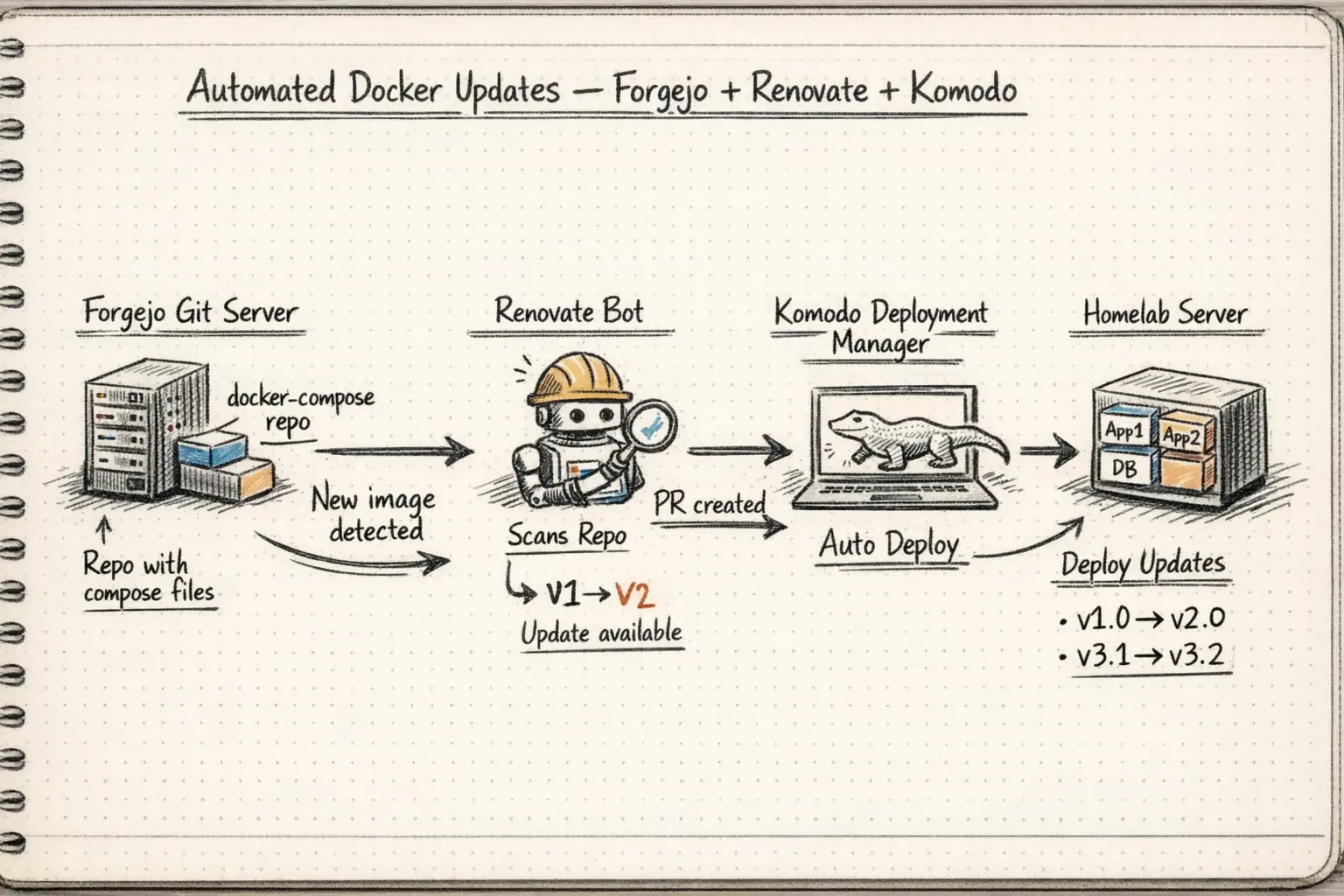
Keeping Docker containers up to date across multiple hosts is one of those tasks that’s easy to neglect. Manual tracking doesn’t scale, and tools like Watchtower/Dockcheck that blindly pull :latest can be a recipe for unexpected breakage. A better approach is to pin every image to a specific semver tag and automate the process of opening pull requests when new versions are available. With this approach, you know if there are breaking changes before you upgrade.
This post walks through setting up that pipeline from scratch using three self-hosted tools: Forgejo as the git server, Renovate as the dependency update bot, and Komodo as the container management layer that deploys changes when PRs are merged. It leans HEAVILY on Nick’s awesome post about the whole process. This is more of a post about setting it up for my particular environment.
The Architecture
The overall flow looks like this:
- Docker Compose files live in a git repo on Forgejo (
rubylaser/bookworm,rubylaser/fileserver) - Renovate runs on a schedule, scans the compose files for image tags, checks registries for newer versions, and opens PRs when it finds them
- You review and merge the PR in Forgejo
- A webhook fires from Forgejo to Komodo, triggering a procedure that pulls the new image and redeploys the stack
The compose files themselves are managed through a symlink pattern to avoid conflicts with container data directories, which is worth understanding before diving in.
The Symlink Pattern for Compose Files
This took some trial and error to get right. I have over 50 containers running on my fileserver host and another 10 on my bookworm docker host. These all have data, configs, and databases in some cases. Doing this wrong could lead to data loss. I ended up building two separarte directory structures.
/docker/compose-files/<app>/compose.yaml— git-tracked, managed by Renovate/docker/containers/<app>/— runtime directory containing.envfiles, data volumes, and everything else
The compose files in /docker/compose-files are what goes into git. Each /docker/containers/<app>/compose.yaml is then a symlink pointing to its counterpart in compose-files:
1
ln -sf /docker/compose-files/appname/compose.yaml /docker/containers/appname/compose.yaml
When Komodo runs docker compose up -d, it runs from /docker/containers/<app>/ so it picks up local .env files and has access to the right working directory for relative volume paths. Renovate only sees the files in the git repo and opens PRs that modify tags in /docker/compose-files.
Below is a simple script to automate the initial symlinking with pre-flight checks. You just need to replace the pathnames with your paths and add your apps names into the APPS variable (e.g. booklore):
1
2
3
4
5
6
7
8
9
10
11
12
13
14
15
16
17
18
19
20
21
22
23
24
25
26
27
28
29
30
31
32
33
34
35
36
37
38
39
40
41
42
43
44
45
46
47
48
#!/bin/bash
set -euo pipefail

COMPOSE_DIR="/docker/compose-files"
CONTAINERS_DIR="/docker/containers"
BACKUP_DIR="/docker/compose-backups/$(date +%Y%m%d_%H%M%S)"
APPS=(appname1 appname2 appname3)  # your app list here

echo "=== Pre-flight check ==="
for app in "${APPS[@]}"; do
    if [ ! -f "$COMPOSE_DIR/$app/compose.yaml" ]; then
        echo "ERROR: $COMPOSE_DIR/$app/compose.yaml does not exist. Aborting."
        exit 1
    fi
done
echo "All source files verified."

mkdir -p "$BACKUP_DIR"

echo "=== Stopping containers ==="
for app in "${APPS[@]}"; do
    docker compose -f "$CONTAINERS_DIR/$app/compose.yaml" down || echo "Warning: $app may not have been running"
done

echo "=== Backing up existing compose files ==="
for app in "${APPS[@]}"; do
    if [ -f "$CONTAINERS_DIR/$app/compose.yaml" ] && [ ! -L "$CONTAINERS_DIR/$app/compose.yaml" ]; then
        mkdir -p "$BACKUP_DIR/$app"
        cp "$CONTAINERS_DIR/$app/compose.yaml" "$BACKUP_DIR/$app/compose.yaml"
    fi
done

echo "=== Creating symlinks ==="
for app in "${APPS[@]}"; do
    if [ -f "$CONTAINERS_DIR/$app/compose.yaml" ] && [ ! -L "$CONTAINERS_DIR/$app/compose.yaml" ]; then
        rm "$CONTAINERS_DIR/$app/compose.yaml"
    fi
    ln -sf "$COMPOSE_DIR/$app/compose.yaml" "$CONTAINERS_DIR/$app/compose.yaml"
    echo "Symlinked $app/compose.yaml"
done

echo "=== Starting containers ==="
for app in "${APPS[@]}"; do
    docker compose -f "$CONTAINERS_DIR/$app/compose.yaml" pull
    docker compose -f "$CONTAINERS_DIR/$app/compose.yaml" up -d
done

echo "=== Done! Backups saved to $BACKUP_DIR ==="
Setting Up Renovate on Forgejo
Renovate needs its own Forgejo user account (renovate-bot) and a dedicated repo (rubylaser/renovate) that holds its global config and the Forgejo Actions workflow that runs it. Nick covers all of this very well on his post.
The Forgejo Actions Workflow
Create .forgejo/workflows/renovate.yaml in the renovate repo:
1
2
3
4
5
6
7
8
9
10
11
12
13
14
15
16
17
18
19
20
name: Renovate
on:
  schedule:
    - cron: '0 12 * * *'  # Daily at noon UTC
  push:
    branches: [main]
  workflow_dispatch:  # Allows manual triggering

jobs:
  renovate:
    runs-on: docker
    steps:
      - uses: actions/checkout@v6
      - name: Run Renovate
        uses: renovatebot/github-action@v40
        with:
          configurationFile: config.js
          token: $
        env:
          RENOVATE_GITHUB_TOKEN: $
The Renovate Config
config.js in the renovate repo:
1
2
3
4
5
6
7
8
module.exports = {
  endpoint: 'https://forgejo.vpn.example.com/api/v1',
  platform: 'gitea',
  token: process.env.RENOVATE_TOKEN,
  gitAuthor: 'Renovate Bot <renovate-bot@example.com>',
  autodiscover: true,
  autodiscoverTopics: ['renovate'],
};
Set the RENOVATE_TOKEN secret in the renovate repo Actions settings to a Forgejo token for the renovate-bot user. Also add RENOVATE_GITHUB_TOKEN — a read-only GitHub PAT — to avoid hitting Docker Hub/GHCR rate limits when Renovate checks for new image versions.
Add renovate-bot as a collaborator on each repo you want it to manage, and add the renovate topic to those repos so autodiscovery picks them up.
The renovate.json in Each Managed Repo
Each repo that Renovate manages needs a renovate.json in its root. Here’s a commented example covering the patterns you’ll encounter:
1
2
3
4
5
6
7
8
9
10
11
12
13
14
15
16
17
18
19
20
21
22
23
24
25
26
27
28
29
30
31
32
33
34
35
36
37
38
39
40
41
42
43
44
45
46
47
48
49
50
51
52
53
54
55
56
57
58
59
60
61
62
63
64
65
66
67
68
69
70
71
72
73
74
75
76
77
78
79
80
81
82
83
84
85
86
87
88
89
90
91
92
93
94
95
96
97
98
99
100
101
{
  "$schema": "https://docs.renovatebot.com/renovate-schema.json",
  "extends": ["config:recommended"],
  "dependencyDashboard": true,
  "dependencyDashboardTitle": "Renovate Dashboard",
  "assignees": ["your-username"],
  "labels": ["renovate"],
  "configMigration": true,
  "prHourlyLimit": 0,
  "docker-compose": {
    "hostRules": [
      { "matchHost": "docker.io", "concurrentRequestLimit": 2 },
      { "matchHost": "ghcr.io", "concurrentRequestLimit": 2 },
      { "matchHost": "gcr.io", "concurrentRequestLimit": 2 },
      { "matchHost": "lscr.io", "concurrentRequestLimit": 2 }
    ],
    "packageRules": [

      // Images that use env-var version references — Renovate can't see these
      {
        "matchPackageNames": [
          "ghcr.io/immich-app/immich-server",
          "ghcr.io/immich-app/immich-machine-learning",
          "ghcr.io/immich-app/postgres"
        ],
        "enabled": false
      },

      // Update Komodo manually alongside core — they must match
      {
        "matchPackageNames": ["ghcr.io/moghtech/komodo-periphery"],
        "enabled": false
      },

      // Images that only publish :latest, :main, or non-semver tags
      {
        "matchPackageNames": [
          "ghcr.io/djdembeck/bragibooks",
          "ghcr.io/fuzzygrim/yamtrack",
          "ghcr.io/kikootwo/readmeabook",
          "excalidraw/excalidraw",
          "ghcr.io/linuxserver-labs/prarr",
          "ghcr.io/netbootxyz/netbootxyz"
        ],
        "enabled": false
      },

      // Intentionally on develop channel — Renovate can't track it
      {
        "matchPackageNames": [
          "lscr.io/linuxserver/sonarr",
          "lscr.io/linuxserver/prowlarr"
        ],
        "enabled": false
      },

      // postgres:alpine has no pinned version — fix the tag first
      {
        "matchPackageNames": ["postgres"],
        "matchCurrentValue": "/^alpine/",
        "enabled": false
      },

      // Never auto-bump postgres major versions
      {
        "matchPackageNames": ["postgres"],
        "allowedVersions": "<17"
      },

      // n8n 2.0 had breaking security hardening changes
      {
        "matchPackageNames": ["n8nio/n8n"],
        "allowedVersions": "<3"
      },

      // Scrutiny uses {version}-{variant} tags — lock to omnibus variant
      {
        "matchPackageNames": ["ghcr.io/starosdev/scrutiny"],
        "versioning": "loose",
        "allowedVersions": "/^[0-9]+\\.[0-9]+\\.[0-9]+-omnibus$/"
      },

      // Guard against major version bumps
      {
        "matchPackageNames": ["prom/prometheus"],
        "allowedVersions": "<4"
      },
      {
        "matchPackageNames": ["grafana/grafana"],
        "allowedVersions": "<13"
      },

      // Flag significant upgrades for manual review before merging
      {
        "matchPackageNames": ["healthchecks/healthchecks"],
        "labels": ["renovate", "review-before-merge"]
      }

    ]
  }
}
Researching Which Images Support Semver
Before Renovate can track an image, it needs proper versioned tags in the registry. GitHub Releases and Docker Hub/GHCR tags are two separate things — a project can publish v1.2.3 on GitHub releases while only pushing :latest to their container registry. You need to verify the registry, not the release page.
To check what tags are actually available:
1
2
3
4
5
# For Docker Hub images
docker pull imagename:v1.2.3

# For GHCR images
docker pull ghcr.io/owner/image:v1.2.3
A manifest unknown error means the tag doesn’t exist in the registry regardless of what the GitHub releases page shows.
Some patterns I encountered while auditing a ~50-container homelab:
Has proper semver — safe to pin and let Renovate track:
ghcr.io/advplyr/audiobookshelf—2.32.1ghcr.io/gethomepage/homepage—v1.10.1ghcr.io/starosdev/scrutiny—1.10.0-omnibus(needsversioning: loose)crowdsecurity/crowdsec—v1.7.6foxxmd/multi-scrobbler—0.8.8danonline/autopulse—v1.5.0golift/notifiarr—v0.9.4ghcr.io/taxel/plextraktsync—0.35.1
GitHub releases exist, but versioned tags not pushed to the registry:
ghcr.io/djdembeck/bragibooks— only publishes:mainand:developghcr.io/kikootwo/readmeabook— only publishes:latestghcr.io/fuzzygrim/yamtrack— only publishes:latestand:devexcalidraw/excalidraw— only ever publishes:latest
Special cases:
plexinc/pms-docker— on:betachannel, not trackablelscr.io/linuxserver/sonarrandprowlarr— intentionally on:developchannelghcr.io/immich-app/*— all components must update together via a shared.envvariable
Connecting Komodo to Forgejo via Webhook
Once Renovate is opening PRs and you’re merging them, you need Komodo to automatically deploy the changes. This is done with a Forgejo webhook that fires on pushes to main and triggers a Komodo procedure.
The Komodo Procedure
Create a procedure in Komodo that:
- Pulls the updated git repo (so the compose file gets the new tag)
- Runs “Batch Deploy Stack If Changed” for all the stacks on that server
The procedure webhook URL will look like:
1
https://komodo.example.com/listener/github/procedure/<procedure-id>/main
Add this as a webhook in Forgejo under the repo’s Settings → Webhooks, set to fire on push events to the main branch.
Komodo Stack Configuration
When configuring stacks in Komodo, set the Run Directory to /docker/containers/<appname> — not /docker/compose-files/<appname>. This is critical because Komodo needs to run docker compose up from the directory that contains your .env files and local data.
Komodo identifies running stacks by their Docker Compose project name. If Komodo runs with -p <project-name> and a container is already running under a different project name, you’ll get a conflict error:
1
Error response from daemon: Conflict. The container name "/appname" is already in use
The fix is to docker compose down the existing stack first, then let Komodo bring it back up under its project naming convention.
Updating Komodo, Forgejo, and the Forgejo Runner
These three should not be updated via Komodo itself since they’re part of the management infrastructure. Update them manually:
1
2
3
cd /docker/containers/komodo
docker compose pull
docker compose up -d
For Komodo specifically, core and periphery must be on matching versions. Update core first, then immediately update periphery on all hosts.
For Forgejo, check the release notes before pulling — Forgejo occasionally has database migration steps between minor versions. The same applies to the Forgejo runner.
A reasonable image pinning strategy for these:
1
2
3
4
5
6
7
8
9
10
11
12
13
14
15
# Komodo — use latest, designed for it, update manually
image: ghcr.io/moghtech/komodo-core:latest
image: ghcr.io/moghtech/komodo-periphery:latest

# Forgejo — pin to exact version, review release notes before updating
image: codeberg.org/forgejo/forgejo:14.0.2

# Forgejo runner — pin to major version
image: data.forgejo.org/forgejo/runner:11

# Forgejo database — pin to major, never auto-bump postgres
image: postgres:17

# dind — pin to major-variant
image: docker:28-dind
Storing Git Credentials Safely
One gotcha when pushing from a server: if the remote URL has credentials embedded in it (e.g. from a previous git remote set-url command), those take precedence over anything in ~/.git-credentials. If you’re getting 403 errors despite having valid credentials stored:
1
2
3
4
5
6
7
8
9
# Check what's actually in the remote URL
git remote -v

# If it has a token embedded, strip it back to a clean URL
git remote set-url origin https://forgejo.example.com/user/repo

# Then set up credential storage
git config --global credential.helper store
git push origin main  # Will prompt for username/token, then save it
Lessons Learned
Pin everything before enabling Renovate. If an image is still on :latest when Renovate first runs, it may not know what the “current” version is and behave unpredictably. Pin to the current semver tag first, then let Renovate take over.
Meilisearch doesn’t migrate automatically. If you run a stack like Karakeep with an embedded Meilisearch and Renovate bumps it across a breaking version, the container will error out with a database version incompatibility. For search indexes that are fully derived from application data (not primary data), the easiest fix is to wipe the Meilisearch data directory and let the application re-index from scratch.
Check docker compose ls when Komodo shows “Project Missing”. This displays the actual project names Docker knows about. If the name doesn’t match what Komodo expects, you’ll need to docker compose down the orphaned stack before Komodo can take ownership.
The postgres:latest vs postgres:16-alpine distinction matters. Unversioned or variant-only tags like postgres:alpine are traps — there’s no version for Renovate to compare against. Always pin to at least a major version: postgres:16 or postgres:16-alpine.
Too Long, Actually Read it ;)
The full setup takes a few hours to get right, mostly spent auditing image tags and writing the renovate.json rules. Once it’s running, the maintenance overhead drops significantly — PRs show up in Forgejo, you review the changelog, merge, and Komodo handles the rest.